Why Heaper Replaces Folders with Links

Folders Made Sense, Until They Didn’t
Folders were designed for a physical world.
You had a cabinet, a drawer, a manila folder, and inside it were papers that belonged there.
It worked because paper existed in one place at a time.
When computers arrived, we copied that same metaphor: icons, folders, subfolders.
But in a digital world, a file doesn’t need to live in one place.
That’s where the cracks started to show.
You duplicate files to use them in multiple projects.
You rename things just to find them later.
You forget where something “belongs.”
The truth is digital information doesn’t fit inside physical logic.
The Multi-Place Problem
Folders create tension the moment something could belong in more than one place.
Is a client’s logo under Designs/ClientA or ClientA/Assets?
Is your tax document in 2024/Invoices or Accounting/Tax?
You can’t win, unless you make copies.
And every copy is another version waiting to get lost, renamed, or outdated.
This is what I call the multi-place problem and it’s why I stopped organizing by folders altogether.
The Heaper Approach: Everything as a Link
Instead of nesting files inside folders, Heaper connects them through links. A link says, this relates to that.
In Heaper, any Block (a file, note, or idea) can be connected to another:
- @Mentions link one Block to another (like connecting a photo to a note).
- #Tags describe what it is (“#Invoice”, “#KeyboardBuild”, “#Research”).
- Connections are visible, bidirectional, and easy to trace.
You don’t file something away, you connect it.
You can view the same Block in multiple contexts without duplication.
That invoice automatically appears under your “Accounting” view, your “Client A” project, and your “Taxes 2024” Heap, because it’s linked, not copied.
Structure That Grows With You
Traditional organization is top-down:
you decide the structure first, then fill it.
Heaper’s system is bottom-up:
you work naturally, and structure emerges from your links over time.
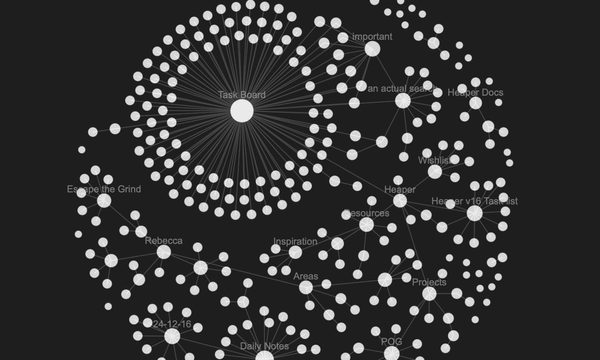
Start with one note, attach a file, add a tag, mention another Block — and a network begins to form.
Later, when you open your Heap, you’ll see that structure come to life.
It’s organic, not rigid.
You don’t plan your folders before you start, you build meaning as you go.
Links Make Discovery Effortless
When you link instead of file, discovery becomes a joy again.
Want to find all photos tagged #Workshop? One click. From there you can dig deeper into your tools or projects but as things are related you could have gotten to the Projects also from your daily notes or even your work area.
Looking for related ideas you didn’t even remember connecting? They’ll find you, and when you see a connection its trivial to add.
The beauty of linking is that it mirrors how we actually think — through associations, not hierarchies.
Folders force you to choose.
Links let you connect.
A Living Network of Ideas
Over time, your Heap becomes more than storage, it becomes a map of your thoughts and projects.
You can browse through it like a photo feed, jump between related notes, or pull up all Blocks that share a tag.
It feels alive because it is alive, constantly growing and reshaping itself based on what you link together.
There’s no “wrong place” for something anymore.
Everything connects.
Why It Matters
Replacing folders with links isn’t just a technical decision, it’s a philosophical one.
It means your digital workspace no longer mimics a filing cabinet.
It reflects how your mind works: fluid, relational, creative.
And that’s what Heaper was designed for
not to store your data,
but to help it make sense again.