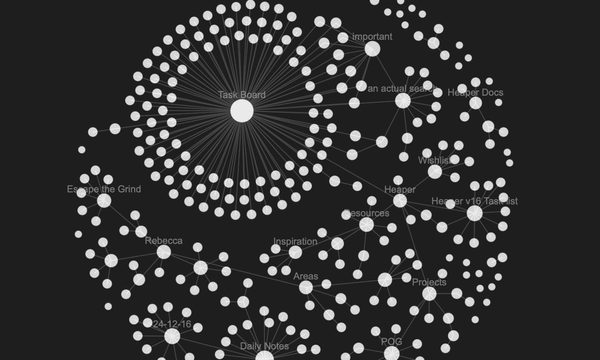
Every file can have a story

In Heaper, every file is a block with rich text notes. Add context to pictures. Attach deadlines, meeting notes, who sent it. Add journal entries to travel photos. Annotate PDFs with research notes. Track changes between versions, no more presentation_final_final.pptx.
Every digital tool promises better organization. Folders, tags, albums, even AI-generated categories. Yet the more apps we use, the easier it becomes to lose track of what something actually means.
- A photo of your electricity meter ends up in “Camera Roll.”
- A design draft lives in “Downloads.”
- The final version of a client project hides inside “Final_Final_v3.zip.”
All these systems store files, but they strip away their context.
That’s the core problem Heaper set out to solve.
What Context Really Means
Context is the invisible layer that turns information into understanding.
It’s the story behind a file:
- Why it exists
- What it relates to
- What needs to happen next
Traditional file systems ignore this. Notes apps, on the other hand, separate context from the files themselves. You might write ideas in Notion or Obsidian, but the related photos, PDFs, or videos live somewhere else entirely.
Heaper’s answer is simple:
Instead of separating them, merge files and context into one unit of meaning.
Introducing Blocks
In Heaper, everything, a note, image, video, or even a folder of assets is a Block.
A Block can contain:
- A file (image, video, document, etc.)
- Rich text for notes, thoughts, or annotations
- Links to other Blocks
- Attributes (metadata, timestamps, named relations) coming soon to heaper
Think of a Block as a living document, not just a file reference, but a container for all the meaning that surrounds it.
You can:
- Attach notes to explain a photo or file
- Link related Blocks (e.g. connect a receipt to a project)
- Tag a Block with a related note to categorize or sort
It’s lightweight, flexible, and relational, without the complexity of a database or the rigidity of folders.
From Folders to Links
Folders assume one truth: a file can only live in one place.
That made sense when things were physical.
But in digital space, that limitation becomes chaos, endless copies, “duplicate” folders, and the mental tax of remembering where things belong.
Heaper replaces folders with relationships.
- @Mentions link one Block to another
- #Tags define type or meaning (“#Invoice”, “#Reference”, “#KeyboardProject”)
- Relationships are visible and traceable, like a map of your digital life
You’re no longer filing things away. You’re connecting them.
Structure emerges naturally from these links, what we call a bottom-up approach. You don’t design a system before using it; it grows with your work.
Why Context Changes Everything
Attaching notes and metadata directly to a file doesn’t just make it easier to find — it makes your data more alive.
- Every file can tell its own story.
- You can revisit old projects and still understand their purpose.
- Files and notes move together, no more broken references or missing context.
- Search becomes human again: look for what it was about, not what it was called.
Heaper’s search doesn’t just find filenames, it finds meaning. Because meaning is stored alongside the content, not elsewhere. Now you can use the fulltext.